
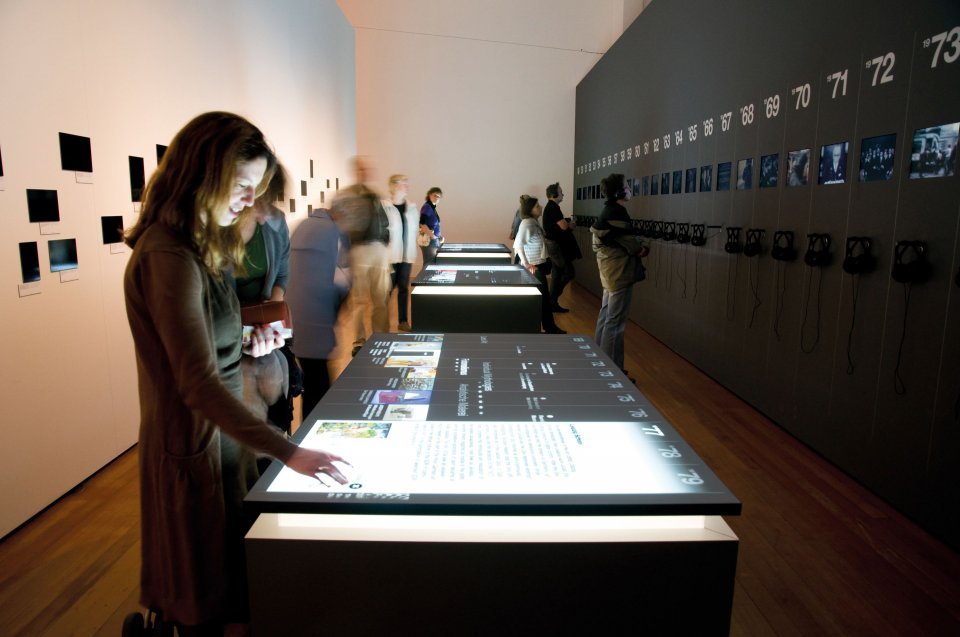
A science exhibition interactive touch table brings scientific ideas into a shared space where visitors can explore them with their hands. Instead of watching a fixed video or reading a long panel, families, students and guided groups can rotate models, compare results, change variables and discuss what they see together. The horizontal format is especially useful when an exhibit is designed for collaboration rather than one-way presentation.
The value of this format does not come from touch technology alone. Screen size, viewing direction, table height, software structure, lighting and circulation all influence whether visitors understand the exhibit. A successful project connects the physical installation with a clear learning objective, so every gesture produces a visible and meaningful response.
Turn Complex Scientific Processes into Visible Interaction
Many scientific subjects are difficult to explain because important changes happen inside a system, across a long period or at a scale that visitors cannot observe directly. A tabletop display can reveal the movement of a mechanism, the orbit of a planet, the layers of a material or the stages of an experiment. Visitors can slow down a process, repeat it and compare different outcomes without waiting for a scheduled demonstration.
On a science exhibition interactive touch table, the relationship between action and result should be immediate. When a visitor changes temperature, pressure, speed or material, the screen needs to show what changes and explain why. This feedback turns an attractive animation into a learning tool. Clear labels, controlled choices and short explanations help users understand the scientific principle instead of simply moving graphics around the display.
Design Multi-User Learning from Every Side
A tabletop exhibit may attract several people at once. The interface therefore needs to support different viewing directions and avoid placing all controls along one edge. Personal work areas can let users examine separate topics, while a shared center can display a combined result. This arrangement encourages conversation without forcing every participant to compete for the same button or window.
Families and school groups often include users with different heights, reading levels and confidence. Large controls, readable text and simple first actions reduce the need for staff assistance. The science exhibition interactive touch table should also respond predictably when several users drag, rotate or enlarge content at the same time. Sensible limits on object size and movement prevent one action from covering the entire surface.
Connect Physical Models with Digital Explanations
Object recognition can link a physical model to corresponding digital information. A visitor may place a planet, machine component, building material or biological model on the table and immediately open related animation, data or comparison content. The physical object provides a memorable starting point, while the screen reveals details that cannot be seen from the model alone.
Recognition must remain stable during repeated public use. The system should distinguish approved objects, respond within a predictable area and recover when an object is removed. Designers also need a fallback interaction, such as an on-screen selection, so the educational activity can continue if a model is temporarily unavailable. Physical pieces require secure storage, durable construction and a clear process for replacement.
Build Content in Layers for Short and Long Visits
Exhibition visitors do not all spend the same amount of time at a display. The first layer should state the topic and available action within a few seconds. The next layer can reveal animation, data and explanatory detail. A deeper layer may introduce a challenge, comparison or discussion question for visitors who want to continue exploring. This structure supports both quick discovery and guided learning.
Content should not begin with a crowded menu. A strong home screen can present one clear invitation, such as building a structure, balancing a system or comparing two outcomes. After each activity, the interface should offer a logical next step and an easy route back to the start. An inactivity timer can reset the application so the next visitor does not inherit unfinished windows or altered settings.
Fit the Table into Exhibition Circulation
The area around the table must accommodate both active users and people passing through the hall. Visitors should be able to stop without blocking an entrance or another exhibit. Table height, reach distance and knee clearance need to match the expected mix of children, adults, seated visitors and standing visitors. A paper mock-up or full-size sample can reveal access problems before production.
Lighting also affects usability. Reflections can hide dark content, while excessive brightness may make the screen uncomfortable at close range. Protective glass needs to balance clarity, impact resistance, touch accuracy and routine cleaning. Speakers should deliver explanations without creating noise conflicts with nearby exhibits. Concealed cables and accessible service panels help the installation remain safe and maintainable.
Select Hardware Around the Learning Application
A science exhibition interactive touch table may use Android or Windows depending on the software, media format and required peripheral support. High-resolution animation, multiple simultaneous windows or 3D content may require greater computing performance than a simple image-and-text application. The screen, touch system, processor, memory, storage and cooling method should be selected as one complete system.
Project planning should also cover network access, USB or HDMI connections, automatic startup, remote content updates and recovery after a power interruption. Public operation requires dependable components and a configuration that can run for long periods without slowing down. Service access should allow technicians to maintain the computer, power supply and control boards without removing the entire table from the exhibition area.
Test with Real Visitors and Real Tasks
Acceptance should measure more than whether the screen turns on and touch points respond. Representative users should complete a real activity while observers record where they hesitate, which instructions they miss and whether several people can participate comfortably. The test can compare completion time, accidental touches, reading distance, object-recognition stability and recovery after inactivity.
The science exhibition interactive touch table should be tested under lighting and operating conditions close to the final venue. Long-duration trials help confirm temperature control, application stability and automatic reset behavior. Cleaning procedures, content replacement and startup routines should also be included in acceptance, because these tasks affect daily operation after the exhibition opens.
Prepare the Project for Long-Term Operation
ZXTLCD can configure the enclosure, display, touch technology, computing platform and optional recognition modules around the intended application. Before volume production, a sample can be used to confirm viewing direction, picture quality, structural details, interfaces and software performance. This reduces the risk of discovering usability or maintenance problems after installation.
A well-planned science exhibition interactive touch table continues to deliver value after its opening day. Clear content management, dependable recovery, durable construction and accessible maintenance keep the experience consistent as visitor numbers grow and exhibition topics change. If you would like to get the specification about above product, contact our sales team now.