
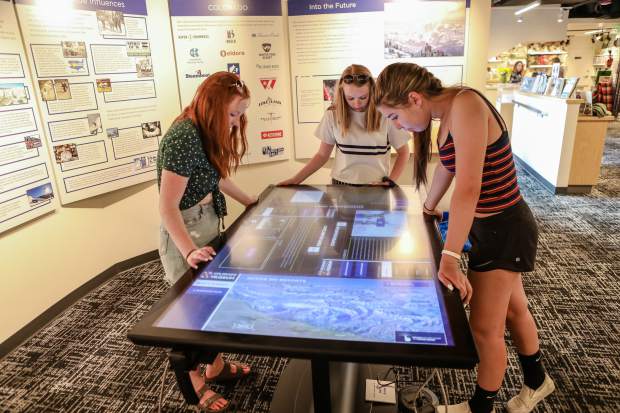
One surface can support different visitor tasks
An interactive touch table does not need to remain a digital catalog. Depending on the exhibition, it can become a product comparison station, digital map, timeline, wayfinding surface, group learning table or control point for a larger display. The correct format comes from the task visitors need to complete, not from the appearance of the equipment.
A corporate showroom may emphasize product comparison, a planning hall may explain space and development, and a museum may focus on stories. Once the central task is clear, screen size, page direction and content depth can be specified with purpose.
Comparison layouts support product decisions
A comparison interface lets users move products or options into a shared area and view meaningful differences side by side. Sales staff can add context while customers save items of interest. An interactive touch table should highlight decision factors instead of placing a complete specification sheet on the first screen.
For multiple users, each participant can select items in a personal area and then move them to the center. The interaction preserves individual exploration while creating a shared conclusion.
Maps and digital models explain spatial relationships
Cities, industrial parks, transport systems and planning projects depend on location, routes and layers. An interactive touch table can use zoom, filters and time controls to explain spatial information, while linking a selection to a physical model or wall display.
The number of controls should remain limited and layer names must be clear. Guided projects can provide a presentation mode for staff, while public exploration uses a simpler interface.
Timelines support deeper narratives
History exhibitions, brand development and construction projects can use a timeline. Visitors enter content by year, person or event, with photographs and video organized around a visible story. Short visits receive a summary, while interested users can open more detail.
Long paragraphs should not dominate the interactive touch table. Video, images, restrained animation and concise explanation need to work together, with a reliable return path at every level.
Accept hardware and content as one system
ZXTLCD can configure an interactive touch table around display format, simultaneous users, media assets and venue conditions. Acceptance should cover multi-user touch, page direction, media loading, linked screens, offline recovery and automatic reset.
Operators also need a clear process for content updates and routine inspection. The interactive touch table will support the exhibition over time only when format, hardware performance and maintenance are aligned.
Match hardware to the dominant display format
Maps and 3D scenes place demands on resolution and computing performance, while image archives and timelines depend on storage and efficient loading. Multi-user comparison emphasizes touch response and interface stability. The interactive touch table configuration should therefore follow the dominant content format instead of accumulating hardware for every hypothetical feature.
Reasonable expansion capacity can be reserved when the exhibition has a defined roadmap, but unnecessary complexity increases maintenance. The project team should document current media resolution, maximum simultaneous windows, expected daily hours and the boundary for future upgrades. A performance test using final assets is more useful than a generic benchmark because it reveals actual loading time, animation smoothness and recovery behavior under the content visitors will see.
Create an Executable Media Specification
Content production needs an executable specification covering image ratios, video encoding, 3D model size, typography and expected text expansion in additional languages. A shared asset standard reduces loading failures and visual inconsistency across display formats. It also lets the interactive touch table team test final-quality material early instead of discovering performance problems after hundreds of files have already been produced.