
An interactive touch table combines display, touch and tabletop space so several users can view, choose and discuss the same content. It is not simply a vertical screen turned sideways: operating direction, reach, table height and the multi-user interface directly shape the experience.
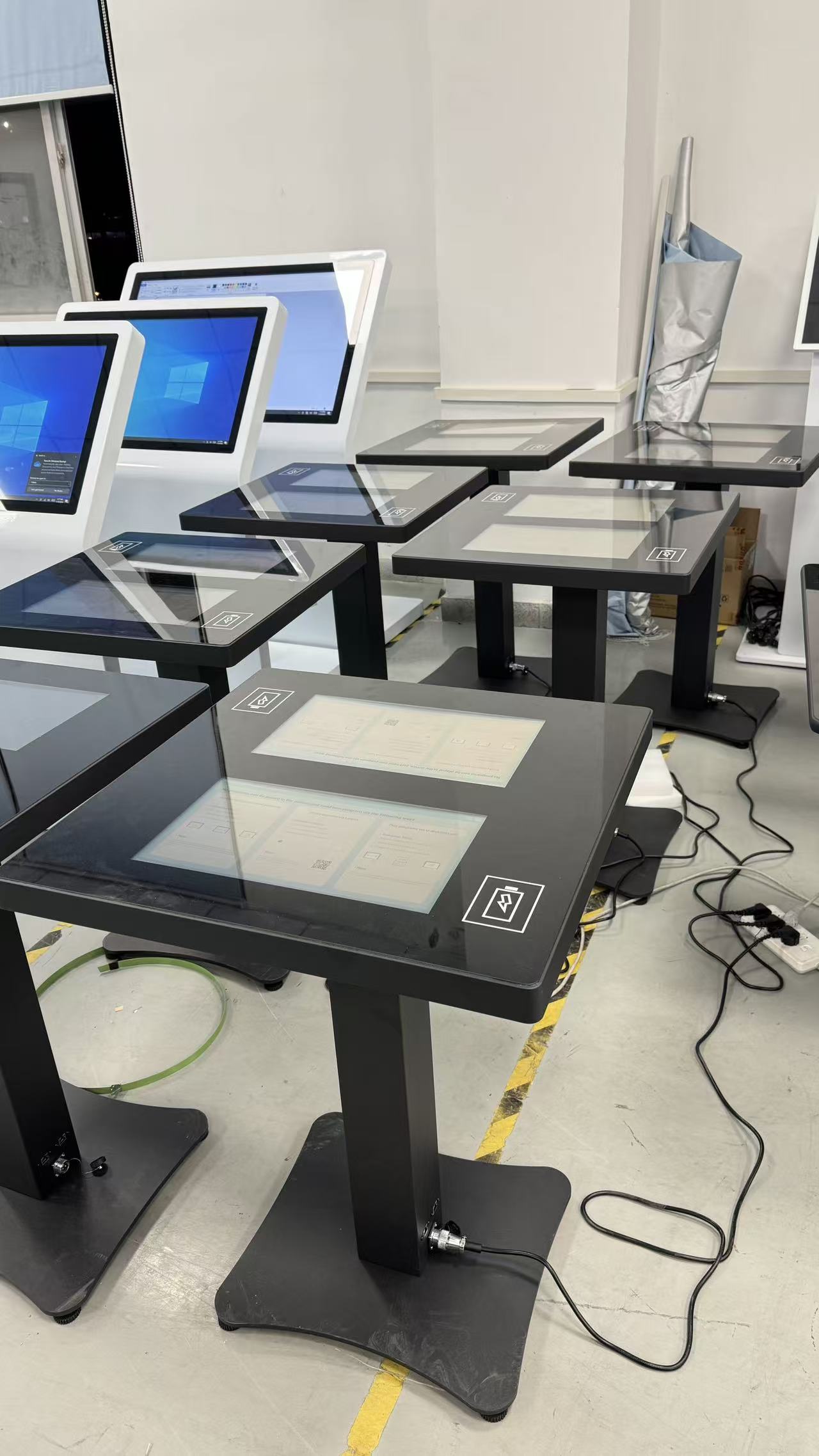
Two 21.5-inch screens face opposite sides of the table, so readers do not crowd around one operating position. Catalogue search and digital reading can run at the same time for students, families and small groups.
Interactive Touch Table: Start with the Library Tasks That Define the Dual-Screen Layout
The project includes seven units, each with two 21.5-inch touchscreens for catalogue search, digital reading, event information and paired learning in a French library.
On the interactive touch table, two 21.5-inch screens face opposite sides of the table, so readers do not crowd around one operating position. Catalogue search and digital reading can run at the same time for students, families and small groups.
Independent Interaction on Two Sides Reduces Waiting
The two displays create separate operating positions, allowing visitors to use the table from opposite sides without competing for one central touch area.
On the interactive touch table, the two displays do not have to behave as unrelated terminals. A library can run independent content or connect both sides for matching, quizzes and themed exploration, supporting both individual search and collaborative learning.
Match Android Hardware with the Library Content System
Android can run touch applications, web catalogues and multimedia content, but the final functions still depend on the customer software, permissions, network and content-management plan.
Android can run catalogue pages, reading applications, event calendars and local multimedia. Large controls and a shallow menu help children, older readers and first-time visitors find the correct entry quickly.
Treat Wireless Charging as a Visitor Convenience
The integrated wireless charger can support compatible devices while visitors search or study, but it does not replace every wired option or guarantee support for every phone.
The wireless charging area remains within easy reach while staying separate from the active screen. Compatible phones can charge during a search or reading session without covering content or causing accidental touches.
Plan Accessibility and Circulation in Public Space
The tables can serve catalogue, digital-learning or activity zones, with clear access on both sides and no obstruction to shelves, emergency routes or staff visibility.
The table suits digital-reading, catalogue and activity zones. Its two-sided arrangement allows placement around shelves and circulation routes while retaining approach space for wheelchair users and accompanying visitors.
Prepare Seven Units for Consistent Delivery
The seven units have not yet shipped; touch response, Android start-up, wireless charging, appearance, accessories and export packing must be checked before any delivery claim.
This batch contains seven units. Each can be checked for display, touch, Android, wireless charging and finish consistency before shipment. A shared configuration simplifies content deployment, backup and replacement across the library.
A Product Configuration Ready for Project Delivery
The interactive touch table can use Android or Windows according to software load and combine the required screen size, touch method, table form, interfaces and optional modules. ZXTLCD can install customer content on a sample and confirm operating direction, picture quality and structural details before volume production.
From the first day of use, a clear start page, stable touch, concealed cables and accessible service construction are part of the product value. The unit should attract users during its first presentation and retain the same experience through repeated operation, content changes and routine cleaning.
The dual-screen structure can also divide one subject into browsing and detailed reading. One side may present catalogue groups, event directories or themed entrances, while the other opens book introductions, images and related material. Two readers can search independently or exchange positions to continue exploring connected content. Across seven units, a consistent page structure and control position reduce the learning curve, allowing visitors to use a table immediately even when they encounter it in a different library zone.