
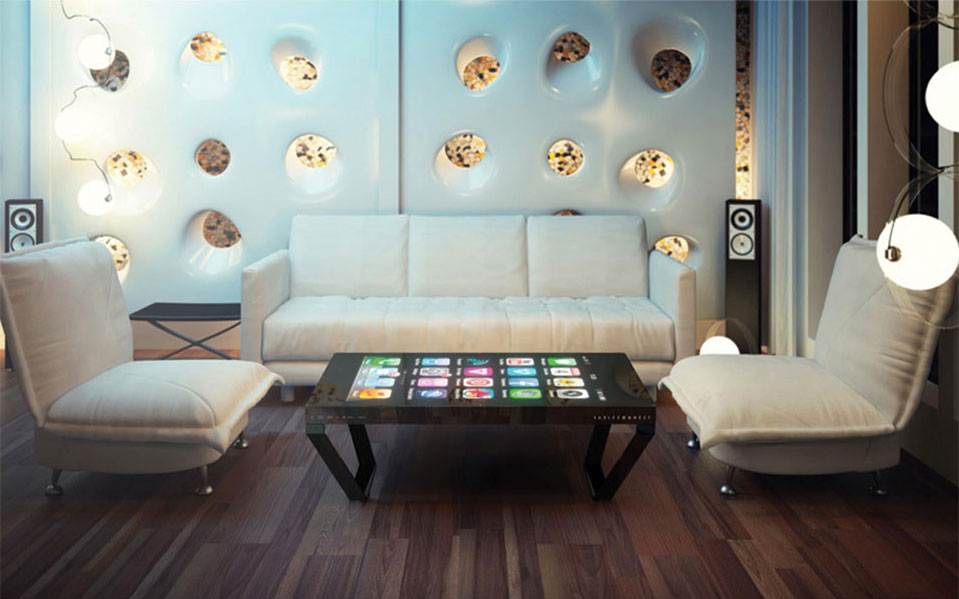
An touch screen coffee table combines display, touch and tabletop space so several users can view, choose and discuss the same content. It is not simply a vertical screen turned sideways: operating direction, reach, table height and the multi-user interface directly shape the experience.
Product presentation, home entertainment, meeting collaboration and hospitality interaction place different demands on hardware. Defining the application and simultaneous users first directs processor, memory, storage and touch spending toward the parts that affect experience.
Touch Screen Coffee Table: Choose Hardware from the Software Task
Product presentation, home games, meeting annotation and collaboration require different performance, so buyers should provide software, resolution, peripheral and network requirements first.
On the touch screen coffee table, product presentation, home entertainment, meeting collaboration and hospitality interaction place different demands on hardware. Defining the application and simultaneous users first directs processor, memory, storage and touch spending toward the parts that affect experience.
Android and Windows Serve Different Applications
Android suits touch applications and controlled content, while Windows supports desktop software and drivers; the right choice depends on the customer program rather than which system appears more advanced.
On the touch screen coffee table, android suits fixed applications, web content and controlled start-up, while Windows supports desktop software, peripheral drivers and more complex local programs. Both provide touch operation; the main difference is the customer software and management method.
Balance Screen Size and Table Proportion
A larger display is not automatically better because viewing distance, seat count, reach range and room scale must determine both screen size and table form.
The display and surrounding tabletop need a balanced proportion. An oversized screen increases the reach to its centre, while a small one weakens shared viewing; seat count, viewing angle and room size should determine the final format together.
Build the Interface for Several Users
Split-screen meetings and multiplayer games require software to interpret multiple touches and orientations correctly; hardware specifications alone cannot guarantee independent use.
A multi-user application can divide the surface into personal zones or let everyone work around central content. Controls should support different orientations and contain overlays so one user does not cover another person’s area.
Include Structure and Service in the Budget
Tempered glass, enclosure material, custom color, computing, interfaces, packing and shipping all affect total cost, while lower performance must not compromise safety or maintenance.
Tempered glass, enclosure colour, computing hardware, interfaces and packing all affect price. A custom budget must cover visible appearance and internal service construction instead of reducing initial cost by omitting cooling, access or safe edges.
Confirm the Configuration with a Working Sample
Before volume production, a sample should run the real software and verify touch, temperature, noise, network, restart, cleaning, base, cabling and service access.
A sample can run the customer software while touch, picture, sound, temperature, network and restart behaviour are checked. Confirming the base, cable outlet and cleaning method before production reduces the risk of discovering a dimensional or usability mismatch on site.
A Product Configuration Ready for Project Delivery
The touch screen coffee table can use Android or Windows according to software load and combine the required screen size, touch method, table form, interfaces and optional modules. ZXTLCD can install customer content on a sample and confirm operating direction, picture quality and structural details before volume production.
From the first day of use, a clear start page, stable touch, concealed cables and accessible service construction are part of the product value. The unit should attract users during its first presentation and retain the same experience through repeated operation, content changes and routine cleaning.