
Use physical models as direct content entry points
An object recognition touch table turns a model, product sample, card or exhibit replica into a direct interactive entry point. When the visitor places the item in the active area, the related photographs, video, specifications, 3D media or story appear without a search through several menu levels. The physical object and digital explanation are connected in one understandable action, which attracts attention and makes the exhibit easier to explore.
This format is effective when an exhibition needs to explain internal construction, product differences, historical context or spatial relationships. The real object retains scale, form and tactile presence, while the screen adds details that cannot be shown completely in the physical exhibit. The object recognition touch table combines both layers in one presentation.
Provide immediate and understandable feedback
After an object is placed, the screen should immediately show its name, central message and available next steps. Clear feedback confirms that recognition has succeeded and prevents visitors from repeating the same action. A concise summary can lead into photographs, video, cases or deeper technical information, supporting both short visits and customers who want more detail.
When the object is removed, the page can close, minimize or remain as a comparison card. The complete interaction follows a natural sequence of picking up, placing, viewing and comparing. Visitors can use the object recognition touch table without learning complicated operating rules before the content becomes useful.
Create a shared surface for several visitors
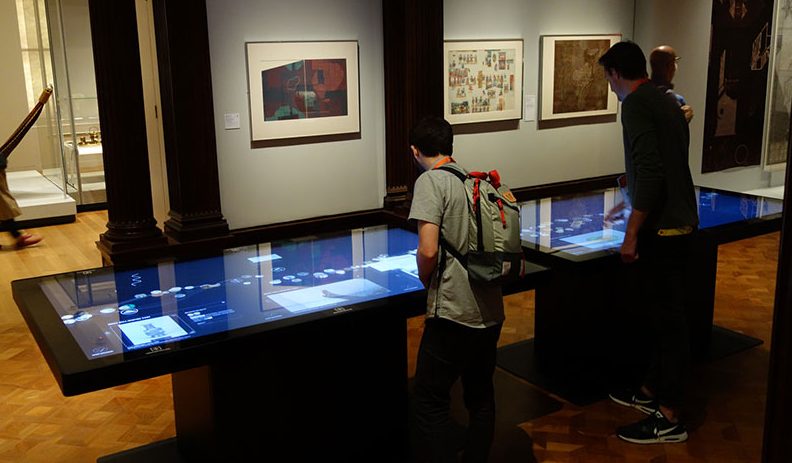
The horizontal table gives families, student teams, customer groups and guides a shared place to work. People can view content from different sides, open separate records and move selected information into the center for discussion. The object recognition touch table therefore functions as a collaborative digital exhibit rather than a single-user information terminal.
Several physical models can open comparisons, material combinations, system relationships or changes between alternatives. A corporate showroom may compare product configurations, a planning hall may combine building modules, and a science center may show how different components change an experiment. Multi-user touch turns physical recognition into a more expressive exhibition tool.
Support museums, showrooms and learning environments
Museums can use replicas, character cards or period objects to open historical narratives, maps and archive media. Corporate showrooms can link samples with construction, process, projects and application solutions. Planning halls can use models to explain districts, transport and development phases, while schools and science centers can present component assembly, material selection and learning tasks.
The equipment may be similar across these venues, but the content follows each goal. Brand reception focuses on product explanation and customer conversation, public culture spaces focus on discovery and understanding, and education focuses on tasks and feedback. Configurable software allows the object recognition touch table to support these different applications.
Build the table for continuous public operation
Exhibition equipment may run for long hours, receive repeated multi-user touch and require frequent cleaning. The enclosure needs stable construction, while the screen surface balances clarity, touch response and daily maintenance. Computing hardware, interfaces, ventilation and power components should remain accessible for service. Concealed cable routes protect the visual design and reduce visitor contact with wiring.
Table height, standing space, reflections and reading direction all affect the experience. Family venues also benefit from rounded edges, a stable base and organized storage for the recognized objects. When the object recognition touch table is coordinated with the room, visitors can approach and use it without blocking circulation.
Keep content current without changing the visitor action
Products, exhibition themes and multilingual material change over time. A content management system can maintain the media assigned to each object independently, allowing photographs, video, specifications and languages to be updated without rebuilding the table or changing the visitor’s basic action. Approved default content, release versions and recovery settings support stable long-term operation.
ZXTLCD can configure an object recognition touch table around table size, number of physical objects, simultaneous users, media, software interfaces and enclosure design. Exhibition contractors and software teams can test the system with actual models and final-quality assets before delivery, including recognition response, multi-user touch, video playback, content switching and automatic return.
Manage the complete life cycle of recognized objects
Recognition objects need records from design and numbering through binding, deployment, storage and retirement. When an exhibition changes, the database should show which items remain active and which have been withdrawn. Otherwise an old token may still open a page that no longer belongs to the current story. Spare objects also need controlled identifiers so a replacement does not accidentally duplicate another item.
Touring exhibitions and multi-site deployments benefit from a shared numbering convention, packing list and location record. Each site can verify objects against the approved content version before opening. During return shipping, the same list identifies missing or damaged items. This operational layer may appear simple, but it determines whether an object recognition touch table can be installed repeatedly without time-consuming rebinding and troubleshooting at every venue.