

When a physical object becomes the interface
An object recognition touch table gives people a direct way to explore digital information without beginning with a menu. A model, token or sample placed on the screen can open the content connected to it, while ordinary touch gestures remain available for browsing, comparison and control. This combination makes the tabletop easy to approach because visitors understand the relationship between the object in their hand and the response on the display.
The experience depends on more than recognizing a marker. The table must identify the object in the correct position, show a clear response, and keep the surrounding interface usable for other people. Recognition speed, touch accuracy, screen brightness and software design work together. When these elements are balanced, physical products and digital information feel like one presentation rather than two separate systems.
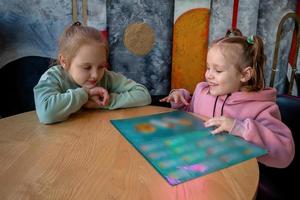
Interactive Teaching
With multi-touch technology, object recognition touch tables enable students to directly engage with educational content, fostering interest and enhancing the effectiveness of teaching.
Experiment Simulations
Providing a platform for science courses to conduct virtual experiments, students can perform simulated experiments on the touch table, enhancing the practicality and fun of learning.
Interactive Learning
Encouraging collaboration and sharing among students, the multi-user interaction feature promotes cooperative group learning, cultivating teamwork and communication skills.
Making classroom subjects tangible
Education benefits when students can test an idea instead of only reading about it. A teacher can place models representing planets, machine parts, chemical elements, historical objects or geographic regions on the table. The object recognition touch table can then display diagrams, animation, video, labels and related questions around each item. Students can rotate the content, compare two models and discuss the result from different sides of the screen.
This format supports small-group learning particularly well. One student may choose an object, another may open supporting information, and others can arrange items into a sequence or category. The teacher remains able to guide the activity without controlling every screen change. Content can be organized for a short demonstration or a longer investigation, allowing the same table to serve several age groups and teaching styles.
Presenting property information around a shared plan
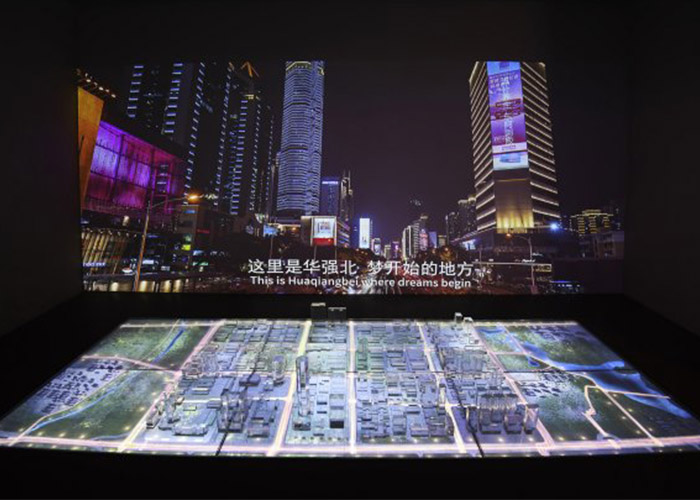
Real estate presentations often require customers to connect a physical model with floor plans, location information and lifestyle content. A building model or apartment token can activate the corresponding digital page. The table can show unit availability, orientation, room layout, nearby facilities, transport routes and rendered views while the physical development model stays visible beside the information.
For a sales team, the advantage is continuity. Customers do not need to move between a model room, wall display and printed brochure to compare choices. Several family members can stand around the table and examine the same project from their own positions. An object recognition touch table can also switch language, save selected units or send a summary to a salesperson, depending on the application and customer-management system.
Real Estate Industry
Property Showcasing
Serving as a display platform, the objective table can showcase 3D models, floor plans, and area layouts of real estate projects, offering clients an immersive virtual viewing experience.
Interactive Touring
Through multi-touch and object recognition capabilities, clients can freely explore maps and nearby amenities on the play touch table, gaining a more intuitive understanding of the advantages and features of the property.
Customer Consultation
Sales representatives can engage in real-time interaction using the touch table, addressing client inquiries, showcasing different property types and configurations, thus enhancing customer experience and satisfaction.
Giving board games a responsive digital layer
Board games use recognition in a different way. Pieces can represent characters, resources, vehicles or locations. When a player moves a piece, the display can update scores, reveal an event, calculate distance or play an animation. Physical pieces preserve the familiar social feeling of a tabletop game, while the screen handles rules and information that would otherwise require cards, counters and repeated calculation.
The system must remain fair and understandable. Every recognized move needs visible confirmation, and accidental placement should not trigger an irreversible action. Multiple players may touch the screen at the same time, so the software should distinguish between moving a piece, pressing a control and resting a hand on the glass. Sound and animation can strengthen the experience, but they should never obscure the current game state.
Recognition methods and physical object design
Different projects use different recognition methods. Optical markers, capacitive identifiers, radio-based tags and specially designed conductive patterns each have advantages. The choice depends on object size, quantity, recognition area, required orientation, budget and the visual appearance of the objects. A museum replica may need an invisible or discreet marker, while a board-game piece can incorporate a recognition base as part of its design.
The object and software should be developed together. Weight, base diameter and surface material affect how steadily the item sits on the glass. The interface needs enough space around a recognized item for labels and controls. If several objects can be used together, the software must define how they interact and what happens when an item is removed.

Innovative Interaction
The table kiosk injects fresh elements into traditional board games, bringing game pieces to life on the screen through object recognition, thereby adding fun and interactivity to gameplay, such as dnd.
Multiplayer Competition
Supporting multi-touch and multi-user interaction, multiple players can participate in board games simultaneously, elevating the competitiveness and excitement of the games.
Educational Integration
Combining entertainment with education, intelligent and intellectual board games can be designed, allowing parents to accompany their children while promoting their learning and development.
Display, computer and enclosure requirements
A horizontal display is viewed from several directions, so wide viewing angles and stable color are important. Anti-glare treatment can improve visibility under exhibition or classroom lighting. The computer configuration should match the application, especially when the table displays high-resolution video, 3D property models or complex game graphics. Android can support focused applications, while Windows is often selected for custom software and higher computing requirements.
The enclosure protects the display and recognition electronics during repeated public use. A stable frame, smooth glass, rounded edges and organized ventilation improve safety and reliability. Service access should allow technicians to reach the computer and controller without dismantling the entire table. Connections for network, USB, audio or external displays can be included according to the project.
Designing content around decisions, not effects
Recognition is most useful when it helps people understand or decide something. In a classroom, the result may be a clearer explanation. In a property showroom, it may be a confident unit comparison. In a game, it may be a faster and more engaging turn. The object recognition touch table should therefore reveal information in a logical sequence rather than triggering visual effects with no purpose.
ZXTLCD can configure screen size, touch technology, recognition method, computer platform, enclosure appearance and interfaces for different interactive projects. Early testing with representative objects and final content helps confirm recognition distance, response speed and multi-user behavior before production.
A flexible platform for physical and digital interaction
The same core technology can support very different experiences because the objects and application define the meaning. An object recognition touch table used for science learning does not need to look or behave like one used in a property showroom or entertainment venue. Each installation can match its audience while retaining the intuitive action of placing something on the screen and receiving an immediate response.
For buyers, the most important evaluation is the complete interaction: how easily the object is recognized, how clearly the information appears and how smoothly people can continue using touch. When the physical object, software and table structure are developed as one system, recognition becomes a practical interface rather than a short-lived demonstration.