
Intelligent Object Recognition Table for Exhibition Engagement


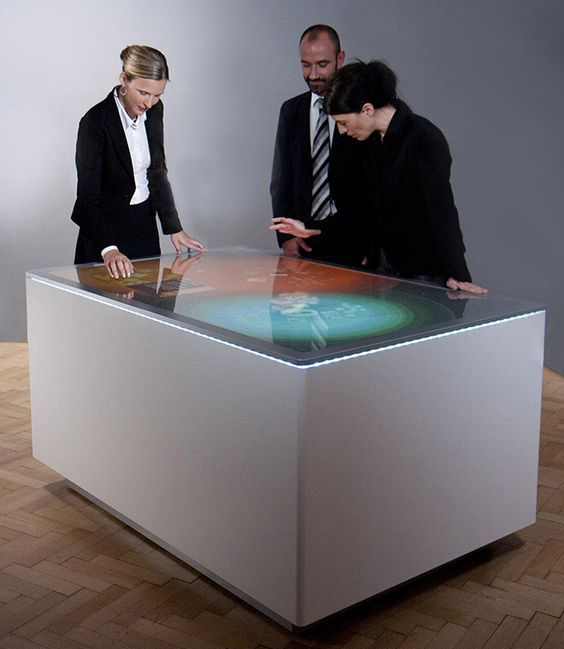
An intelligent object recognition table gives exhibition visitors a direct way to connect physical items with digital information. A model, sample or marked token placed on the screen can open specifications, video, maps or three-dimensional content without requiring users to search through menus. The table then combines recognition with ordinary multi-touch gestures, allowing several people to explore, compare and discuss information around one shared surface.
Use Physical Objects as Clear Interactive Prompts
Physical objects can make an interface easier to understand. Their shape and graphics indicate what they represent, while an immediate response confirms that the system has recognized them. Product models may open colors and installation examples; museum replicas may reveal historical context; material samples may trigger sustainability or manufacturing information. Every object should support a defined visitor task instead of acting as a novelty.
The intelligent object recognition table should respond close to the placed item so users can see the relationship between action and result. Rotation may change a configuration, and movement may reposition a digital scene. Feedback must remain visible while a hand is holding the object. When an unsupported item appears, a short prompt is better than silence because visitors otherwise assume that the screen has failed.
Select Recognition Technology Around the Project
Passive optical or capacitive tokens can avoid batteries, while RFID and other sensing methods may suit different object designs. Glass thickness, lighting, sensor position and recognition footprint affect performance. The final objects should be tested early because a demonstration token may not represent the shape, weight or movement of the items used in the installed exhibition.
Durability also matters. Public tokens need a stable base, comfortable handling and a plan for storage or replacement. Tethers may prevent loss but can restrict movement. The correct choice depends on staff supervision, session length and how many objects must be available simultaneously. Inventory and cleaning procedures should be part of the operating plan.
Coordinate Recognition and Multi-User Touch
Recognition opens the information journey, while touch gestures let visitors continue exploring. Users may enlarge images, move documents, play video or send selected items into a shared comparison area. Controls should stay outside the physical footprint of the object. Clear ownership rules prevent one visitor from closing another person’s content when several objects and hands are active.
An intelligent object recognition table needs stable tracking under crossed hands, resting palms and rapid object placement. Performance testing should include the maximum number of objects and users expected in the venue. After inactivity, the application should clear previous choices, return to the home screen and prepare the table for the next group without staff intervention.

Design Content for Comparison and Guided Sales
In a showroom, staff can place two product models on the surface and compare features, finishes and applications without opening separate brochures. Visitors can explore independently and then move selected information into a shared area for discussion. The content hierarchy should begin with the most useful decision and provide deeper technical material only when requested.
Museums and education centers can use objects to connect abstract information with tangible examples. A building model may open floor plans, a historical replica may reveal a timeline, and a material sample may show its lifecycle. Short instructions, readable type and consistent gestures keep the experience accessible to first-time visitors and mixed-age groups.
Match Hardware to Interactive Media
High-resolution images, multiple video windows and three-dimensional scenes require suitable processing and graphics capability. Windows may support customized recognition software and peripherals, while other platforms can suit focused applications. The complete program should be tested with all intended objects active, because smooth response matters more than a specification that has not been validated under real load.
The intelligent object recognition table should start automatically, recover after a power interruption and keep public users away from operating-system menus. Authorized staff need controlled content updates and diagnostic access. If network data is used, cached content and an offline fallback prevent technical error screens from interrupting the visitor experience.
Plan Glass, Lighting and Service Access
Horizontal glass can reflect spotlights and daylight, so brightness, contrast, content colors and surface treatment should be approved together. Protective glass must tolerate frequent cleaning while maintaining touch and recognition accuracy. Rounded edges, a stable enclosure and secured power cables support safe public use.
Displays, computers and sensors generate heat inside the enclosure. Airflow must remain effective after final installation, and quiet cooling is important in galleries and meeting rooms. Service panels should reach the computer, touch controller, recognition hardware and power modules without dismantling the complete table. Labeled cables and replaceable parts reduce downtime.
Prepare Staff for Daily Operation
The intelligent object recognition table benefits from a simple daily checklist covering glass cleaning, token inventory, startup confirmation and application restart. Staff should know how to identify a damaged object, record a recognition problem and restore the approved configuration. Remote support can diagnose software issues, while local access remains necessary for physical service. Clear procedures reduce unnecessary downtime and keep the interaction consistent across different operating shifts.
Validate the Complete Visitor Journey
Prototype testing should use the final objects, glass, enclosure and representative content. Ask typical visitors to begin without explanation, compare items and reset the session. Observe recognition speed, touch conflicts, reach, reflections and whether physical objects hide essential controls. Continuous operation reveals reliability issues that a short demonstration may miss.
ZXTLCD can configure an intelligent object recognition table around the required screen size, enclosure, operating system, recognition method and content workflow. Early coordination between the object designer, software team and hardware integrator produces a clearer and more dependable exhibition experience. If you would like to get the specification about above product, contact our sales team now.