
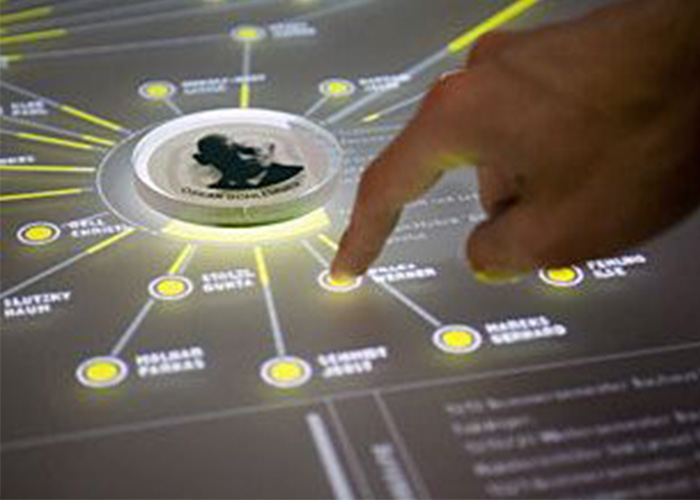
A human machine interaction touch table changes digital control from a private desktop task into a shared physical experience. Visitors can approach from different sides, manipulate information with direct gestures and connect physical objects with on-screen content. This format supports exhibitions, showrooms, collaboration rooms and education spaces where discussion and simultaneous participation are more valuable than a single-user kiosk.
Design Interaction Around Human Actions
Direct touch reduces the distance between intention and result. Users tap an item, move a document, rotate an image or enlarge a map without translating the action through a mouse. The interface still needs clear feedback, large targets and predictable limits. Natural gestures are useful only when first-time visitors can understand what happened and how to return to the starting point.
The human machine interaction touch table should organize controls for the viewing directions people actually use. Personal zones can support independent browsing, while a central area holds selected information for group discussion. Text orientation, reach distance and screen ownership must be tested with representative users rather than decided only from a desktop mockup.
Support Reliable Multi-User Collaboration
Several hands may cross, rest on the glass or move quickly at the same time. Touch tracking needs to remain stable under this real behavior. A high touch-point number is not enough if the application cannot manage simultaneous windows. Clear ownership rules and visible active states prevent one participant from interrupting another person’s work.
Group tasks benefit from a shared workflow. Individual users can explore products, documents or ideas, then move selected items into a comparison area. The application may limit the number of open objects to protect readability. After inactivity, an automatic reset clears previous choices and prepares the system for the next group.
Connect Physical Objects with Digital Information
Object recognition can make the starting point more tangible. A marked model, material sample or token placed on the surface may open related specifications, video or a virtual scene. Rotation and movement can change settings when the relationship is obvious. Physical objects should be durable, easy to handle and tested with the final glass and sensing method.
A human machine interaction touch table should explain unsupported objects instead of appearing unresponsive. Recognition feedback needs to appear close to the item without being hidden by a hand. Multiple tokens require software rules for screen space and ownership. Passive tokens simplify charging, although storage, cleaning and replacement remain part of daily operation.
Choose a Display Surface for the Environment
Horizontal screens can reflect spotlights, windows and overhead fixtures. Brightness, contrast, content color and glass treatment should be tested together in the final lighting plan. Anti-glare treatment may improve readability but can change sharpness. A full-size sample helps the team review labels, dark imagery and viewing angles before production.
Protective glass needs to withstand frequent cleaning while preserving touch accuracy. Rounded edges, stable support and secured cables improve public safety. Accessibility checks should include reach, text size, color contrast and seated use. Important controls should not depend only on color or sit where resting hands naturally cover them.
Match Computing Hardware to the Application
Windows may support customized collaboration software, object recognition and advanced peripherals, while Android can suit focused catalogs and information applications. Processor, memory, storage and graphics capability should be measured with the final program and maximum user load. Responsive interaction matters more than specifications that have not been validated through real tasks.
The human machine interaction touch table should start automatically, recover after power interruption and prevent public access to system menus. Authorized staff need controlled content updates and diagnostic access. If network data is required, cached information and a useful offline state prevent technical errors from interrupting the public experience.
Apply the Table to Real Visitor Goals
Showrooms can present product ranges, configurations and installation examples. Museums can organize collections and connect replicas with digital interpretation. Planning halls can provide maps and project stages, while meeting rooms can support collaborative review. Each application needs its own information hierarchy, session length and balance between self-service and staff guidance.
Optional cameras, speakers, NFC, wireless charging and recognition modules should serve a defined journey. Every addition affects power, cooling, software and maintenance. A focused configuration is usually easier to understand and more dependable than a table filled with unrelated features. Acceptance criteria should follow the tasks visitors must complete.
Plan Cooling, Maintenance and Recovery
Displays, computers and controllers generate heat inside a horizontal enclosure. Airflow must remain effective after installation near walls or furniture, and quiet fans are important in galleries and offices. Service panels should reach major modules without dismantling the entire table. Replaceable parts and labeled cables reduce downtime.
Daily procedures can cover glass cleaning, startup checks and application restart. Staff should know how to report recurring touch or content issues. Remote support can assist with software diagnosis, while local access remains necessary for physical service. A backup of the approved configuration makes recovery easier after maintenance.
Validate the Complete Interaction System
Prototype testing should ask representative users to complete real tasks from different sides. Observe reach, reflections, response time, gesture conflicts, recognition behavior and session reset. Continuous operation reveals heat and stability problems that a short demonstration may miss. The final approval should cover the enclosure, glass, computing hardware and software together.
ZXTLCD can configure a human machine interaction touch table around the venue, screen size, operating system, enclosure and content workflow. Coordinating interface design, hardware and maintenance early creates a dependable shared experience. If you would like to get the specification about above product, contact our sales team now.