
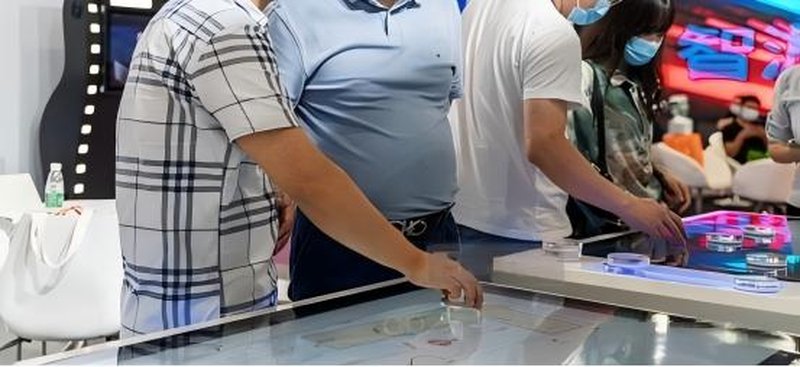
The 55-inch object recognition touch table is a commercial interactive device that integrates touch interaction with object recognition technology. It is mainly used in smart exhibition halls, educational demonstrations, museum exhibits, and corporate product showcases. Its core function is to identify specific physical tokens or tangible items placed on the tabletop and trigger corresponding digital content displays or interactive operations. By combining physical items with digital information, the device transforms traditional display methods into a more intuitive interactive experience.
I. Technical Principles and Core Components with a 55-Inch Object Recognition Touch Table
The 55-inch object recognition touch table can incorporate infrared touch technology to achieve on-screen interaction. Infrared touch screens typically arrange infrared transmitters and receivers around the periphery of the screen to form an intersecting optical grid. When a finger or other object blocks part of the optical path, the system determines the touch position based on the optical change, thereby completing operations such as clicking and selecting.
Object recognition relies on specialized sensors, identification tags, or image recognition solutions, with specific approaches depending on the device configuration. The touch system is responsible for identifying the user’s operational position, while the object recognition system determines the identity or position of specific items. Only through their synergy can rich interactive functions be realized.
The equipment typically consists of a display screen, touch components, an object recognition module, a control system, and a chassis structure. The display screen presents images, videos, and interactive user interfaces; the control system processes recognition information and executes corresponding commands. Housing materials, connection interfaces, system compatibility, and protective capabilities should be confirmed according to specific product specifications and operational environments.
II. Object Recognition and Interaction Logic
The key to object recognition functionality lies in establishing a mapping between physical items and pre-configured digital content.
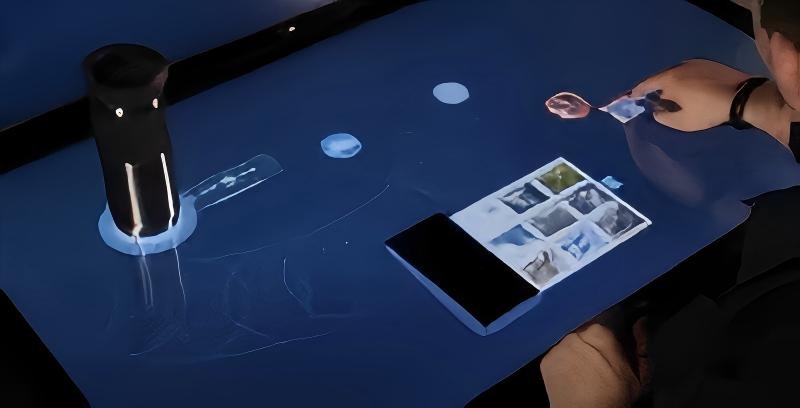
When a token or item bearing a specific identifier is placed on the tabletop, the recognition system acquires relevant data and passes it to the interactive software. The software matches the corresponding content based on preset rules and subsequently displays introductions, graphics, videos, 3D models, or other interactive information on the screen.
For example, in a smart showroom, visitors can place an exhibit model in a designated area, and the screen will immediately present relevant product overviews, structural breakdowns, or application demonstrations. In educational settings, students can place various teaching models to view corresponding knowledge content, seamlessly blending physical observation with digital explanation.
If the system supports multi-object recognition, it can simultaneously process multiple qualified items and present distinct content according to software design. Actual recognition capacity, positioning accuracy, and response speed depend on the recognition module, software algorithms, and overall equipment configuration.
III. Application Scenarios and Operational Considerations
The 55-inch object recognition touch table is suitable for various commercial and educational environments requiring physical interaction and digital display:
Museums and Exhibition Spaces: Blending exhibit models with digital narration to display historical backgrounds, structural details, or relevant video archives, enhancing visitor engagement.
Corporate Showrooms: Triggering presentation content by placing product models, helping visitors understand product functions, internal structures, technical highlights, and application scenarios.
Educational and Science Popularization Venues: Combining physical teaching aids with interactive courseware to support knowledge discovery, model identification, and thematic learning activities.
Commercial Retail and Showcases: Presenting tailored promotional information based on different merchandise or display subjects, providing digital support for interactive marketing, product walkthroughs, and themed exhibitions.
In practical use, sharp objects should be prevented from scratching the screen surface, and regular cleaning of the tabletop and related components should be performed according to equipment guidelines. For products using infrared touch, attention should also be paid to strong ambient light, dust, and other environmental factors that may affect recognition stability. Specific maintenance requirements should follow the actual equipment structure and user manuals.
IV. Technical Advantages and Enhanced Interactive Experience
Compared with conventional interactive displays that only support fingertip touch, object recognition touch tables integrate tangible items into the interaction workflow, allowing users to trigger digital content by placing, moving, or choosing objects.
Infrared touch technology supports operation via fingers and other qualifying objects. However, screen touch recognition and physical item identification represent distinct technical functions and cannot simply be regarded as the same system. Designated content can only be triggered according to physical items when the device is equipped with corresponding object recognition modules and interactive software.
Furthermore, the 55-inch active display area provides ample space for graphics, videos, diagrams, and interactive interfaces, making it ideal for multi-user collaboration, observation, and discussion around the table. The actual interactive effect is closely tied to display quality, software UI/UX design, touch responsiveness, and structural aesthetics.
In terms of product design, tabletop dimensions, exterior finishes, recognition methods, software features, and enclosure structure can be customized based on specific application requirements. For equipment intended for long-term deployment in public venues, structural stability, ease of cleaning, and daily maintenance feasibility should also be carefully evaluated.
V. ZXTLCD 55-Inch Object Recognition Table Solution
ZXTLCD can tailor 55-inch object recognition table solutions according to diverse requirements across smart showrooms, educational presentations, museum exhibits, and corporate product showcases. By seamlessly integrating display panels, touch components, object recognition modules, and interactive software, physical objects are linked to digital content, creating an intuitive interactive presentation workflow.
During solution planning, focus should be placed on confirming object recognition methods, identifiable item types, concurrent recognition capabilities, software content management workflows, and installation/maintenance specifications. For projects requiring bespoke interactive content, mapping relationships between physical items and digital data must be defined in advance to ensure seamless hardware and software synergy.
The core value of the 55-inch object recognition touch table lies in merging physical object manipulation with digital information presentation, transforming presentations, explanations, and learning from passive viewing into active engagement. Selecting recognition technologies suited to the application scenario and designing thoughtful interactive content will maximize the device’s potential in commercial display and educational demonstrations.
Looking for customized 55-Inch Object Recognition Touch Table hardware, multi-touch interactive tables, or OEM/ODM commercial display solutions? Feel free to contact the ZXTLCD engineering team for free consultations, product demos, and tailored technical specifications.