

An object recognition gaming table combines the immediate visual feedback of a digital game with the physical participation of board-game pieces, dice and themed tokens. The display can present maps, animation, rules and media, while real objects remain part of the player’s decisions and social interaction. A useful system does not simply place an ordinary game on a large screen. It creates a clear connection between every physical action and the digital response that appears around it.
Use Physical Objects as the Natural Game Interface
When a player places a recognized model or token on the surface, the system can identify its role and open related character information, tasks or options. Moving the object may change position, while rotation can adjust direction, status or configuration. Feedback should appear immediately and close to the object so the player understands what caused the result.
Tokens need suitable weight, size and base construction. Public entertainment venues require objects that tolerate frequent handling, while home and meeting environments may prioritize storage and appearance. Passive recognition can avoid batteries, but staff still need a method for cleaning, counting and replacing lost or damaged objects.
Continue the Experience with Multi-Touch Control
Recognition can open the content journey, and ordinary gestures allow players to continue. They may enlarge maps, move cards, select skills, review rules or play explanatory video. Controls should remain outside the physical footprint of a token so hands and models do not cover important actions.
An object recognition gaming table needs clear personal areas and a shared central map. One player should not accidentally close another person’s content. When several objects appear at the same time, the software must control window placement and keep the game state understandable. Removing a token should produce predictable behavior rather than suddenly deleting important progress.

Preserve the Physical Appeal of Board Games
Dice, pieces and cards matter because they create real movement, randomness and face-to-face conversation. If every step is completed automatically, the experience can become another video game and lose the character of tabletop play. Recognition can read a result, follow a piece or display additional information without removing the player’s decision.
Automatic scoring and rule reminders can reduce repetitive work, allowing players to focus on strategy and communication. Digital effects can change scenes or reveal hidden information that would be difficult with printed materials. The technology should support the physical game rather than compete with it.
Configure the Table for Home and Entertainment Venues
At home, the table can change from a gaming surface into a coffee table, media browser or information display. Child and guest modes should prevent access to operating-system settings. A simple startup page can separate entertainment content from private files and administrative controls.
Clubs and game venues need fast session reset, account logout and token inventory. Staff should be able to restore the home screen immediately when a group leaves. Glass cleaning, object wear, long operating hours and audio volume must be included in the daily plan. Replaceable tokens and a backup configuration reduce downtime.
Add Interactive Entertainment to Dining Spaces
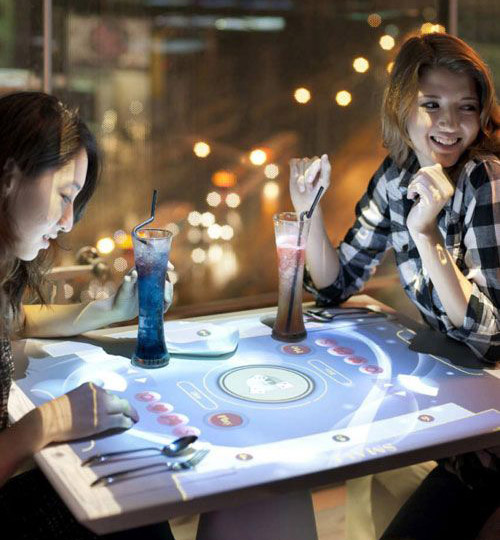
Restaurants can combine menu browsing, brand content and simple tabletop games so customers have an activity while waiting. Family and themed restaurants may benefit from content that supports the atmosphere. Ordering and entertainment functions still need separate navigation, and every order must have a clear confirmation step.
Food-service environments require compatible cleaning methods, protected edges and well-positioned ports. Entertainment software must not cover service controls or interrupt staff operations. If the network is unavailable, the table should preserve basic menu information and avoid presenting technical error pages to customers.
Extend Object Recognition into Showrooms and Meetings
The same recognition logic can turn product models into presentation controls. Placing two products on the surface may open specifications, finishes and installation examples for comparison. In a meeting room, recognized objects can represent projects, departments or options, helping teams organize complex information around a shared surface.
Entertainment, presentation and meeting modes should use separate permissions. Public gaming users must not reach enterprise documents or network resources. Authorized staff need controlled content publishing and diagnostic access without exposing technical menus during normal operation.
Test Recognition, Touch and Graphics Together
An object recognition gaming table processes graphics, multi-touch input and object data simultaneously. Processor, memory and graphics capability should be tested with the maximum number of players and active tokens. Delayed recognition makes users move an object repeatedly, while touch lag slows the game and creates confusion.
Testing should include rapid placement and removal, crossed hands, continuous sessions and power recovery. Horizontal lighting can reflect across the surface, so brightness, content color and glass treatment need review in the final environment. The protective glass must preserve both touch and recognition accuracy after installation.
Plan Service Access and Final Acceptance
Service panels should reach the computer, touch controller, recognition hardware, power supply and cooling components. Labeled cables and replaceable modules reduce repair time. Staff procedures can cover cleaning, startup, token inventory, application reset and problem reporting.
ZXTLCD can configure an object recognition gaming table for homes, clubs, restaurants, showrooms and meeting spaces. Coordinating objects, software, enclosure and maintenance before production creates a more dependable experience. If you would like to get the specification about above product, contact our sales team now.
For procurement teams, the final decision should also include spare-part availability, remote support procedures, software update responsibilities, and a documented handover plan. These details help operators keep the installation useful after launch, reduce downtime, and protect the experience across repeated public or commercial use.