
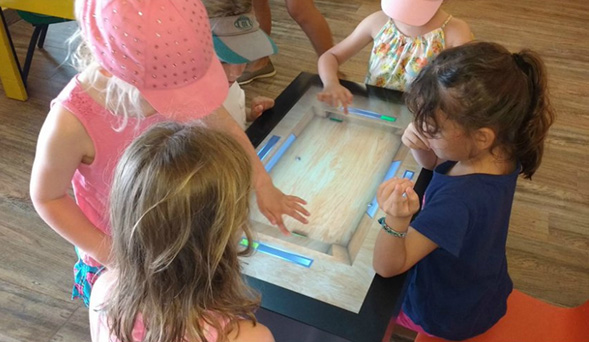
A kindergarten touch screen table gives young children a shared place to explore stories, numbers, shapes, language and creative activities. Unlike a tablet used by one child, a horizontal interactive surface encourages children to stand or sit together, notice what others are doing and solve a task as a small group. The technology becomes useful when it supports teaching goals and natural social interaction rather than simply adding another screen to the classroom.
Early-learning environments require different design decisions from offices or commercial showrooms. Controls must be easy to recognize, text and pictures must remain clear from several directions, and the enclosure must be safe for frequent contact. Teachers also need content that can be started, paused and reset without technical support. These practical details determine whether the table becomes part of daily learning or remains an occasional attraction.
Create Shared Activities Instead of Isolated Screen Time
Collaborative learning begins when several children can contribute to the same outcome. Sorting animals by habitat, arranging a story sequence, matching sounds with pictures or completing a large puzzle gives each child a visible role. The kindergarten touch screen table can divide the surface into personal areas and a shared center, allowing children to work independently for a moment and then bring their answers together.
The application should reward discussion rather than speed alone. If the fastest child can complete every task before others participate, the activity does not support teamwork. Turn prompts, role-based steps and goals that require multiple objects can distribute participation more evenly. A teacher can also use the table for guided questions, asking children to explain why they chose an answer before the group moves forward.
Match the Interface to Young Learners
Young users may not read instructions fluently, so the first action should be understandable through pictures, color and short audio cues. Large buttons, generous spacing and consistent icons reduce accidental touches. Important controls should not sit only on one side of the display because children gather around the table from different directions. Rotating or duplicated controls can make the interface equally usable for everyone.
A kindergarten touch screen table should provide immediate feedback without overwhelming the user. A clear animation, gentle sound or visible change confirms that the system understood the action. Error feedback should encourage another attempt instead of presenting technical messages. Activities also need a simple home screen and an automatic reset so the next group begins with a clean and predictable state.
Support Language, Numeracy and Creative Development
Language activities can connect letters, sounds, images and spoken instructions. Children may arrange characters into a story, record a short response or match an object with its name. Numeracy activities can use visible groups of objects to demonstrate counting, comparison, patterns and simple addition. The large surface lets teachers observe how children approach a problem and offer support without taking control of the activity.
Creative tasks are equally important. Children can combine shapes, colors and textures to make a picture, design a simple scene or build a musical sequence. Saving selected work for later classroom discussion gives the activity a purpose beyond the moment of interaction. Content should offer open-ended choices as well as right-or-wrong exercises, because early learning includes imagination, communication and confidence.
Choose Safe and Practical Classroom Hardware
The enclosure needs rounded edges, stable construction and concealed cables. The protective surface should resist routine contact while maintaining touch accuracy and clear images. A kindergarten touch screen table is cleaned frequently, so the glass and surrounding materials should tolerate the approved cleaning method without trapping dirt around exposed joints. Ventilation and service access must remain protected from curious hands.
Table height and reach distance should be checked with the intended age group. A screen that is too wide may place central controls beyond a child’s comfortable reach, while a table that is too high excludes smaller users. A full-size mock-up can reveal these problems before production. If seated use is planned, the design should also consider chair position, knee clearance and wheelchair access.
Select Performance Around the Learning Software
Screen size, touch technology, processor, memory and operating system should be selected as one system. Simple matching activities need fewer resources than applications with several simultaneous users, high-resolution animation or video. Android may suit focused applications, while Windows can support a broader range of customized education software and peripheral devices. The final choice should follow the confirmed program rather than a specification list alone.
The kindergarten touch screen table should be tested with rapid repeated touches, several moving objects and long classroom sessions. Startup behavior, sound level, temperature and recovery after a power interruption also matter. Teachers should be able to launch approved content without seeing system menus, and administrators should have a controlled method to update applications or restore the standard configuration.
Give Teachers Useful Classroom Control
Teachers need more than a collection of games. Useful management features include activity selection, session duration, volume control and the ability to return the table to its home screen. Content can be organized by age, subject or learning objective so staff can prepare a lesson quickly. When appropriate, the system may record completion data without collecting unnecessary personal information.
A short teacher guide should explain startup, cleaning, content selection and basic troubleshooting. The table should not depend on one technically skilled employee. Clear operating routines make it easier to use the equipment across multiple classes and shifts. Remote support may assist with diagnosis, but common actions should remain available to authorized staff at the installation site.
Test the Experience with Children and Educators
Acceptance testing should involve representative users completing real activities. Observers can record whether children understand the first instruction, share the surface, reach the controls and recover from mistakes. Teachers can evaluate whether the activity fits lesson time and whether they can guide the group without blocking the display. These observations are more valuable than confirming touch-point count alone.
ZXTLCD can configure a kindergarten touch screen table around the required screen size, operating system, enclosure, touch method and learning application. A sample can be used to verify safety details, picture quality, software performance and daily operating procedures before volume production. If you would like to get the specification about above product, contact our sales team now.