
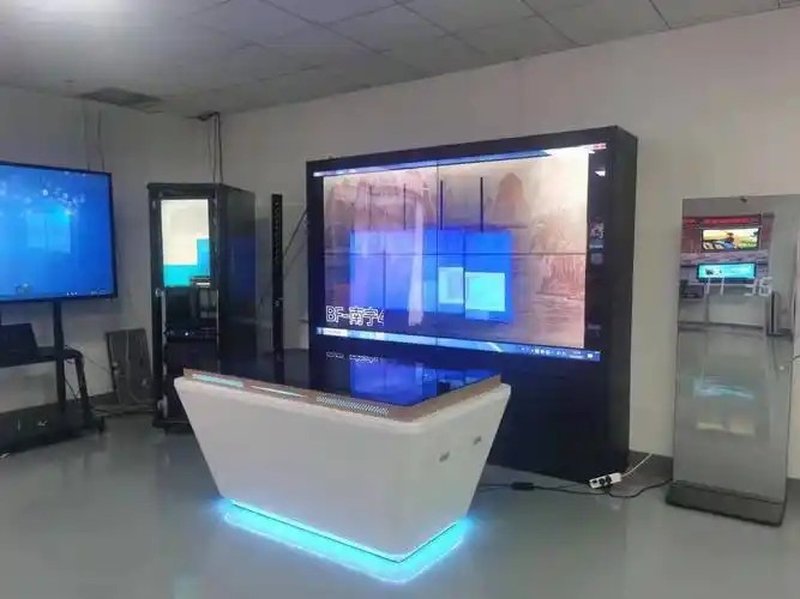
Deploying a commercial-grade AR VR Object Recognition Table provides interactive venues with an advanced digital display platform. In digital display and interactive experience scenarios, AR/VR object recognition touch tables combine touch technology, object recognition, and 3D visualization content to provide a new interactive medium for education, commercial displays, and exhibition events. Users can touch the screen or place specific tangible objects to trigger corresponding virtual content and interact with digital models. Depending on system configuration, the device can also support multi-user collaboration, virtual scene navigation, and cross-screen displays, transforming conventional static showcases into highly engaging, participatory experiences.
I. Technical Principles and Hardware Composition with a AR VR Object Recognition Table
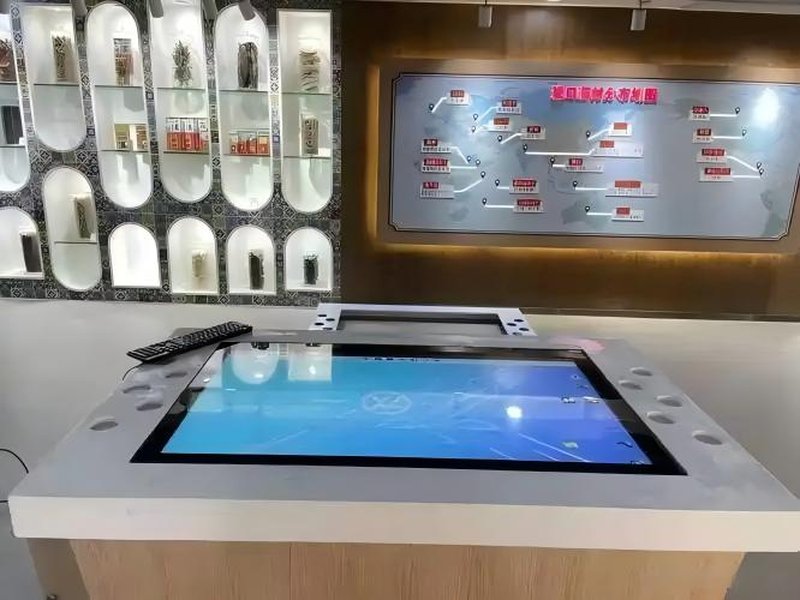
An AR/VR object recognition touch table typically consists of a support structure, display and touch components, an object recognition module, a control system, and interactive software. These parts collaborate seamlessly to enable physical object identification, operational command processing, and digital content presentation.
The support structure secures the equipment and provides stable load-bearing capacity. The tabletop display area can feature protective structures such as tempered glass suited to specific product designs, housing integrated display screens and touch sensors that provide visual real estate for images, videos, 3D models, and interactive user interfaces. Power distribution and the host control unit drive system operations, data computation, and software execution, with specific interfaces, operating systems, and hardware specs customized according to project demands.
Object recognition is a pivotal link in connecting physical and virtual realms. The device can utilize specific recognition markers, dedicated tokens, or other adapted recognition solutions. When an identifiable item is placed on the tabletop, the system captures corresponding identity or positional information and transmits it to the interactive software, triggering pre-configured digital content.
If the device incorporates multi-touch technology, it can accommodate simultaneous multi-user operations. Note that tangible object recognition, multi-touch control, and virtual reality content represent distinct technical modules, with actual capabilities determined by hardware, software, and system integration.
II. Core Functions and Application Scenarios
1. Linking Physical Objects with Virtual Content
The object recognition table establishes a direct correspondence between specific tangible items and digital assets. For instance, in museums or historical exhibition halls, when visitors place an artifact replica onto designated tabletop zones, the system can display relevant historical archives, 3D reconstructed models, or animated walkthroughs.
In corporate product showrooms, physical product mockups serve as interactive gateways, triggering structural breakdowns, functional explanations, or application demonstrations. This interaction mode empowers visitors to grasp presentation content through hands-on operation.
2. Multi-Touch Control and Collaborative Operation
Multi-user interaction is a primary application direction for object recognition tables. Through multi-touch capabilities and rational UI design, multiple users can gather around the table to browse information, select objects, and manipulate digital models simultaneously.
For example, in educational settings, teachers and students can collaboratively examine 3D structures, reposition or select different models, and foster discussions around a central topic. In urban planning showcases, participants can review regional data, toggle viewing angles, or adjust display subjects according to supported software features.
The efficacy of multi-user operations depends on touch performance, software interaction logic, and designated zone layouts. For collaborative projects requiring division of labor, partitioned interfaces, operation rules, or permission settings can be implemented to eliminate operational conflicts.
3. Virtual Scene Exploration and Cross-Screen Display
Combined with 3D visualization, object recognition tables can be utilized to explore virtual architecture, industrial designs, geographic spaces, and other digital scenarios. Users can switch viewpoints, inspect localized details, or review contextual data based on software capabilities.
Selected bespoke solutions also support synchronized linkage between the table and external video walls or large displays. For example, when a user selects a display item on the tabletop, an external display concurrently renders the corresponding high-resolution 3D model or introductory visuals, achieving a cohesive tabletop-to-wall interaction synergy.
Cross-screen linkage, virtual scene roaming, and real-time synchronization are specialized capabilities configured via custom software development and system integration rather than default factory settings.
III. Operational Methods and Guidelines for Use
In a typical object recognition interaction workflow, users first place an identified item in a designated zone; the system decodes the data, prompting the interactive software to invoke corresponding media or functionality. Users can subsequently explore details, switch pages, or manipulate virtual objects via intuitive touch gestures.
During multi-user engagement, user interfaces must remain clear and interaction rules easily understood. When deploying multiple recognition items or multiple operational zones, mappings between physical items and digital assets should be meticulously planned in advance to avoid misidentification or chaotic operations.
Daily operational maintenance should focus on:
– Equipment Placement: Ensure the table is leveled securely with ample operating clearance surrounding the perimeter.
– Screen Maintenance: Use cleaning agents compatible with screen materials, and strictly avoid sharp objects scratching the display surface.
– Electrical Safety: Connect power supplies according to technical specifications, ensuring proper grounding and voltage stability.
– Software Management: Periodically audit interactive programs, asset libraries, and OS performance to guarantee operational stability.
– Functional Compatibility: Validate compatibility between recognition modules, touch components, 3D content, and external display peripherals prior to full deployment.
For projects demanding customized dimensions, bespoke enclosures, or dedicated interactive software, deployment environments, interaction flows, and technical requirements should be explicitly outlined during the initial design phase.
IV. Technical Advantages and Enhanced Interactive Experience
Compared with traditional display monitors restricted to passive playback, AR/VR object recognition touch tables integrate physical objects, multi-touch control, and digital assets, guiding users from passive observers to active explorers.
First, physical items serve as intuitive portals to digital data, making complex technical concepts easily digestible. Second, multi-touch and multi-user collaboration facilitate group discussions, presentations, and joint operations, making the tables invaluable for educational pedagogy, showroom narrations, and engaging public events. Third, 3D models, dynamic animations, and virtual environments deliver versatile presentation formats, elevating overall showcase impact.
It is worth distinguishing that object recognition touch tables do not necessarily require users to wear AR or VR headsets. The tabletop screen can natively render 3D visuals and interactive interfaces, whereas fully immersive augmented or virtual reality experiences may involve additional software stacks, secondary displays, or wearable hardware peripherals.
For projects requiring intricate 3D interactions, the hardware can interface with industry-standard 3D engines and interactive suites. Specific APIs, file formats, cross-screen protocols, and expansion capabilities should align with actual system configurations and project plans.
V. ZXTLCD AR/VR Object Recognition Table Solution
ZXTLCD tailors end-to-end AR/VR object recognition touch table solutions for educational presentations, museum exhibitions, corporate experience centers, commercial showcases, and interactive planning applications.
System engineering revolves around custom tabletop dimensions, display and touch technologies, object recognition modules, interactive software development, 3D asset modeling, and external video wall integration. For collaborative environments, special emphasis is placed on touch partitioning, user journey design, and content synchronization. For physical model-triggered presentations, priority is given to defining recognition methodologies, token geometries, and underlying content mapping logic.
By harmoniously unifying industrial-grade hardware, precise recognition mechanisms, and intuitive interactive software, object recognition tables bridge physical manipulation with digital storytelling, providing visitors, students, and stakeholders with a compelling, hands-on path to discovery.
The fundamental value of an AR/VR object recognition touch table lies not merely in rendering 3D graphics on a flat plane, but in building meaningful bridges between tangible objects, digital assets, and human actions. Selecting recognition technologies suited to the exact deployment context and crafting balanced multi-user interactive experiences unlocks the full interactive potential of modern digital exhibition spaces. In conclusion, adopting a professional AR VR Object Recognition Table enhances presentation capabilities, engages multi-user audiences, and drives digital transformation.
Looking for customized AR VR Object Recognition Table hardware, multi-touch interactive tables, or OEM/ODM commercial display solutions? Feel free to contact the ZXTLCD engineering team for free consultations, product demos, and tailored technical specifications.