
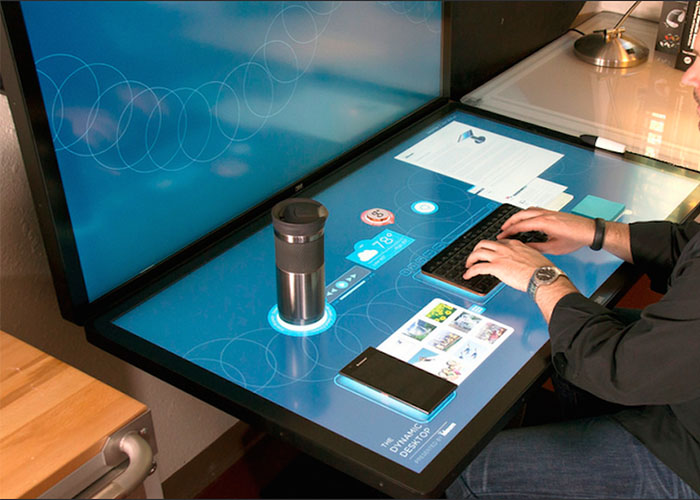
A commercial LCD touch table is more than a horizontal screen installed inside a piece of furniture. It must support information display, multi-user interaction, structural stability, long operating hours and practical service access as one complete system. Exhibition halls, shopping centers, sales offices, museums and meeting rooms may all use a touch table, but their requirements for screen size, software, lighting, enclosure design and maintenance can be very different. A reliable project therefore begins with the user journey and installation environment instead of a list of hardware specifications.
Choose Screen Size Around Reach and Group Size
Smaller screens can suit individual information search, compact reception areas and focused product catalogs. A larger horizontal display provides more space for maps, media and comparison content, and it can allow several visitors to participate from different sides. However, a screen is not automatically more useful because it is larger. Controls near the center may become difficult for children, seated users or shorter visitors to reach.
Before production, the main interface should be reviewed at full scale. The team can check whether buttons are comfortable to reach, whether hands cover important information and whether personal browsing areas have enough space. Screen size also affects glass weight, enclosure strength, transport and service procedures. The display, touch sensor, glass and table structure should be approved together rather than selected as unrelated parts.
Evaluate Display Quality in the Final Lighting
Horizontal displays can reflect ceiling lights, windows and exhibition spotlights. Brightness, contrast, content colors and glass treatment should be tested together under conditions similar to the installed venue. Anti-glare options can improve visibility, although every treatment may slightly change perceived sharpness. Projects that present detailed drawings, maps or product images benefit from testing real content on a finished sample.
The interface also needs to suit horizontal viewing. Text should be larger than it would be on a desktop page, and essential controls require generous spacing. Important content should not be placed where hands and arms naturally rest. If people approach from several directions, text orientation and navigation must work for each expected position.
Plan Multi-User Touch Beyond the Touch-Point Number
A touch-point specification does not by itself describe the visitor experience. The commercial LCD touch table must remain stable when hands cross, palms rest near the edge and several windows move at the same time. Personal zones can let visitors browse independently, while a central space holds selected items for comparison and discussion. Clear ownership rules prevent one person from closing another user’s content.
The application should also control how many objects can remain open. A crowded display becomes difficult to understand even when the computer continues to respond. After a period of inactivity, the system should clear the previous session and return to the approved home screen. This prepares the table for the next group and prevents earlier choices from remaining visible.
Select Android or Windows Through the Software Plan
Android can suit product catalogs, image and video presentation, wayfinding and other focused applications. Windows may be preferable for customized software, advanced graphics, external devices and established enterprise programs. The operating system should follow the application rather than being selected only through purchase price or familiarity.
Processor, memory, storage and graphics capability need to be measured with the final program. Insufficient hardware produces delayed touch feedback and uneven video, while unnecessary performance increases cost and heat. The commercial LCD touch table should be tested under the maximum expected user and media load, including several simultaneous windows and long operating periods.
Use Built-In Software to Support Real Tasks
Image browsing, video playback, digital books, maps, whiteboards and presentation tools can reduce development work, but more functions do not automatically create a better installation. A corporate showroom may need product comparison and guided sales content. A museum may require collections, timelines and multiple languages. A meeting room may prioritize document review and annotation.
The home screen should lead directly to the venue’s primary tasks. First-time visitors need to understand what information is available, how to begin and how to return. Content managers require a controlled method for publishing approved updates, while public users should never reach the operating system or administrative settings.
Build the Enclosure for Continuous Operation
Protective glass must withstand frequent touch and cleaning while maintaining accurate response. Rounded edges and a stable enclosure support public safety, especially when several people lean toward the surface. The approved cleaning process should be tested with the glass coating and enclosure finish so routine maintenance does not reduce clarity or damage materials.
The display, computer and power supply generate heat inside a horizontal enclosure. Intake and exhaust paths must remain effective after installation near walls or furniture. Quiet cooling is important in galleries and offices. Service panels should reach the computer, touch controller, power supply and fans without requiring the entire table to be dismantled.
Coordinate Customization with Content and Interior Design
Enclosure color, branding, border width, screen size and interface locations can be customized around a project. These decisions should be coordinated with the application and installation plan. Otherwise, decorative borders may cover controls, cameras may use the wrong angle or service doors may become inaccessible after surrounding furniture is installed.
A commercial LCD touch table benefits from early review by the content team, hardware integrator and interior designer. A styled sample allows them to evaluate finish, proportions, reflections, touch behavior and service access as one experience. This reduces late changes and helps the digital table feel intentional in the venue.
Validate the Complete System Before Delivery
Acceptance should cover more than whether the screen turns on. Test automatic startup, power recovery, continuous operation, multi-user touch, media playback, network interruption, session reset and maintenance access. Representative visitors should complete real tasks so the team can observe reach, reflections, orientation and interface understanding.
ZXTLCD can configure a commercial LCD touch table around the venue, screen size, operating system, enclosure and software workflow. Coordinating display, touch, computing and structure before production creates a more dependable installation. If you would like to get the specification about above product, contact our sales team now.