
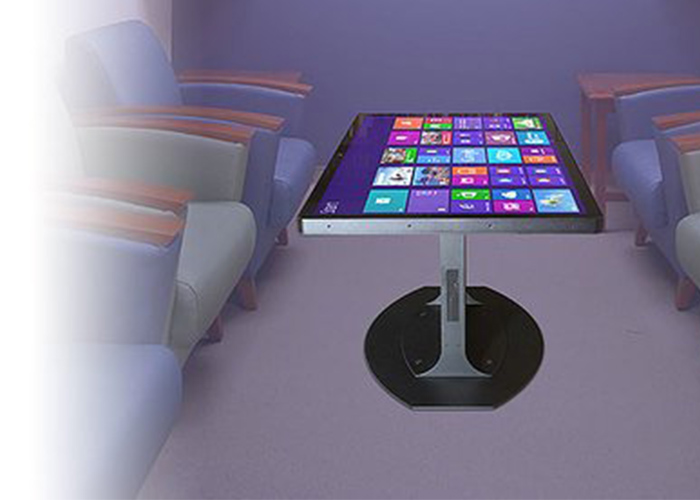
A themed interactive coffee table can become part of an interior rather than looking like equipment placed in the middle of a room. Hotels, lounges, brand spaces, property sales centers and private clubs often need digital interaction without losing the atmosphere created by furniture, lighting and materials. The table therefore has to combine screen performance with proportions, finishes and software that belong to the venue.
Successful customization begins with the experience the space is trying to create. A luxury lounge may favor quiet product discovery, a family area may need games and wayfinding, and a brand showroom may use the table for guided comparison. These differences influence the enclosure, screen orientation, sound, computing platform and content structure long before color is selected.
Start with the Interior Theme and Visitor Journey
Designers should map where visitors first see the table, how they approach it and whether they use it alone or with a host. The themed interactive coffee table may function as a visual centerpiece, a waiting-area activity or a working surface during consultation. Each role needs a different balance between decorative presence and direct access to the display.
Proportions should match nearby seating and circulation. A very large surface can dominate a small lounge, while a table that is too narrow may not support several users. A full-size floor plan or mock-up helps confirm table height, reach distance, chair position and walking clearance before production.
Coordinate Materials, Color and Structural Details
Metal, wood-effect finishes, stone patterns and custom colors can connect the enclosure with the interior concept. The selected finish must also tolerate fingerprints, cleaning and routine contact. Decorative details should not block ventilation, service panels or wireless signals. Samples viewed under the actual lighting provide a more reliable color decision than screen images alone.
A themed interactive coffee table needs consistent edge treatment and concealed fasteners. Rounded corners can improve comfort in hospitality spaces, while a clean base prevents cables from disturbing the furniture appearance. If storage, lighting, speakers or charging modules are added, their positions should feel intentional and remain accessible for maintenance.
Make Digital Content Belong to the Space
Visual design should follow the venue’s typography, colors and tone. A hotel may show local services and destinations, a showroom may present products and case studies, and a club may offer events or member information. The home screen needs one clear invitation instead of a crowded menu, allowing new visitors to understand the first action within seconds.
Transitions, animation and sound should support the atmosphere rather than interrupt it. Quiet spaces may use restrained motion and optional audio, while entertainment areas can support richer effects. Content should also return automatically to the home screen after inactivity so the table is ready for the next visitor.
Support Shared Browsing and Guided Conversation
A coffee-table format naturally lets people gather around content. Personal browsing zones can allow two visitors to explore separately, while a central area presents selected items for discussion. In a sales environment, staff can move plans, images or specifications into the shared area without turning a laptop toward the customer.
The themed interactive coffee table should keep controls readable from the expected seating positions. Multi-touch gestures need predictable limits so one user cannot accidentally cover another person’s content. Large targets, visible feedback and simple navigation support both self-service use and guided presentations.
Choose a Screen and Surface for Ambient Lighting
Hospitality and showroom lighting can create reflections across a horizontal screen. Brightness, contrast, glass treatment and content colors should be tested together in conditions close to the final location. Anti-glare options may improve visibility, but the effect on sharpness and finish needs to be reviewed with real material samples.
The protective surface must remain clear under frequent cleaning and maintain accurate touch response. Dark glass can show fingerprints, while exposed seams can collect dirt. The themed interactive coffee table should use a cleaning method compatible with the glass, enclosure finish and any decorative material surrounding the display.
Integrate Charging and Other Useful Modules
Wireless charging can add practical value in lounges and waiting areas when it is positioned where a phone does not obstruct the main interaction. USB charging, NFC, cameras, speakers or object recognition may also support specific applications. Optional modules should be chosen because they serve the visitor journey, not simply because space is available.
Each module affects internal layout, power distribution and service access. Charging areas need clear markings, cameras need appropriate viewing angles, and speakers need openings that do not weaken the enclosure design. Prototype testing should confirm that all functions operate simultaneously without causing heat or electrical instability.
Select Computing Around the Content Plan
Android can suit focused catalogs, wayfinding and media applications, while Windows may be appropriate for customized presentation software, multiple peripherals or complex visual content. Processor, memory, storage and graphics capability should be tested with the final application. Excess hardware adds heat and cost, while insufficient hardware makes touch interaction feel delayed.
The themed interactive coffee table also needs reliable automatic startup, controlled updates and recovery after power interruption. Public users should not reach system menus. Authorized staff need a straightforward way to change approved content, restart the application and restore the standard configuration.
Plan Maintenance without Disturbing the Interior
Service panels should allow technicians to reach the computer, power supply, control boards and cooling components without moving heavy furniture through a finished space. Internal cables benefit from clear routing and labels. Replaceable components reduce downtime and prevent minor failures from requiring a complete table replacement.
Daily operation should include cleaning, visual inspection and a simple startup check. Remote support can assist with software diagnosis, while local access remains necessary for physical service. The maintenance plan should respect venue operating hours so work can be scheduled without disrupting guests or sales activities.
Approve the Final Table through a Styled Sample
A sample lets the project team review finish, proportions, reflections, touch response and content as one experience. Representative users can sit around the table, complete real tasks and confirm that charging or optional modules do not interfere with the display. This review should happen before volume production and final interior installation.
ZXTLCD can configure a themed interactive coffee table around the venue, enclosure style, screen size, operating system and required modules. Coordinating hardware and content with the interior concept creates a useful digital feature that feels intentional in the space. If you would like to get the specification about above product, contact our sales team now.